Short answer: FigureLabs draws a good pathway figure from one prompt in about a minute, and it has a real editing canvas. The free plan is a trial, not a working plan: in our account it paid for one image a day, and its figures may not be used in a publication. If you want to edit a figure on a canvas and export vectors, FigureLabs is worth paying for. If you mostly need finished images quickly and do not want a subscription, compare it with PaperBanana before you decide.
This FigureLabs review is written by the team behind PaperBanana, a competing tool, so read it with that in mind. Everything below is either something we did ourselves on November 12, 2026 or something stated on FigureLabs' own pages on that day, and we say which is which.
What FigureLabs is
FigureLabs is an AI tool for scientific figures. You describe a figure in text, or upload a sketch, a photo or a reference figure, and it generates an illustration that opens on a canvas. Its site lists three products: Illustration, Flowchart and Plot. After an image is generated, the toolbar above it offers Quick Edit, Region Redraw, Text Edit, Upscale, Remove BG, Remove Text, Split Layers and Edit in Canvas, plus an Export menu.
We tested the Illustration product only. We did not test Flowchart, Plot or any of the editing tools, because the free credits ran out after one image.
What the FigureLabs free plan gives you
This is the part the pricing page does not make obvious until you are inside the product.
- One image a day, in our account. The account panel showed 50 free daily credits that reset each day, and no other credits. Generating one illustration cost 50 credits, so the balance went to zero after the first figure. The pricing page also lists a one-time credit grant for free accounts; the account we used on November 12 did not have one left.
- Raster export only, at 1K. The pricing page lists SVG and PPTX export for illustrations as paid features, and prices a vector export at 150 credits.
- No publication use. The pricing page says free plans are for non-commercial use only. Publication rights, with a downloadable certificate, come with the paid plans.
- Two models. The free plan lists Nano Banana Pro and GPT Image 2. Paid plans list nine to twelve.
So the free plan answers one question well: does this tool draw the kind of figure I need? It is not enough to prepare the figures for a paper.
FigureLabs pricing
Prices as shown on the FigureLabs pricing page on November 12, 2026, during a sale. The page showed list prices of $10, $35 and $99 next to them. Check the page before you buy; these numbers will change.
| Plan | Monthly price shown | Credits per month | About how many images | Largest export |
|---|---|---|---|---|
| Free | $0 | 50 a day in our account | 1 a day | 1K |
| Starter | $9 | 1,000 | 20 | 4K |
| Plus | $26 | 5,000 | 100 | 8K |
| Pro | $74 | 20,000 | 400 | 8K |
The image counts assume 50 credits per generated image, which is what the pricing page lists and what our test was charged. Edits use credits too: the page lists 50 for a region redraw, 60 for a text edit, 10 to 40 for upscaling and 150 for a vector export. If you plan to edit each figure a few times and export it as a vector, budget several hundred credits per finished figure, not 50.
The test: one pathway prompt in three tools
We gave the same prompt to FigureLabs, to BioRender's AI assistant and to PaperBanana, each with its default settings, and ran it once in each:
Draw the canonical Wnt/β-catenin signaling pathway in two side-by-side panels: "Wnt OFF" (destruction complex degrades β-catenin) and "Wnt ON" (β-catenin accumulates, enters the nucleus and activates TCF/LEF target genes). Label Frizzled, LRP5/6, Dishevelled, Axin, APC, GSK3β, CK1.
One run per tool is a small test. Image models vary from run to run, so treat the result as an example, not a ranking.
| FigureLabs (free) | BioRender (free) | PaperBanana | |
|---|---|---|---|
| Time to a finished image | About 1 minute | About 5 minutes of generation, with two steps that wait for you | 23 seconds |
| Steps | One prompt | Questions, four sketches, color draft, then conversion to an editable figure | One prompt |
| All seven requested labels present | Yes | Yes | Yes |
| Errors we could see | None | None | One β-catenin shape left without its label, and one stray symbol in a caption |
| Cost of this image | 50 credits, the whole daily allowance | Within the free allowance | 10 credits |
| Editing afterwards | Canvas tools (not tested) | Every element selectable | Edit by prompt, or convert to an editable file for 10 credits |
FigureLabs. Its automatic setting chose Nano Banana Pro at 16:9 and returned a 1376 × 768 image. Both panels were correct as far as we could check: the destruction complex with Axin, APC, GSK3β and CK1, phosphorylation and ubiquitination of β-catenin, the proteasome, and in the ON panel Dishevelled at the receptor, free β-catenin, nuclear translocation and TCF/LEF with co-activators. The drawing style was close to the flat, rounded look that biology readers know from BioRender. It was the most polished of the three on this prompt.
BioRender. Its assistant works in stages. It asked four questions about the level of detail, drew four grayscale layout sketches, produced a color draft from the one it recommended, and then converted the draft into a figure in which each protein and arrow is a separate, selectable object. The figure was clean and correct. It also took the longest by a wide margin. We describe the free plan's limits in our BioRender alternatives post.
PaperBanana. We used the Standard generator with the Methodology Diagrams style and Nano Banana 2.1 at 1K, which are the defaults on a Basic or Pro plan. The image came back in 23 seconds at 1200 × 896. All seven labels are there, and the two panels tell the same story as the other tools' figures. It also has two flaws that the other two did not: one of the three β-catenin shapes in the ON panel has no text, and a stray symbol follows the word "Recruited". Both would need a fix before the figure went into a paper.
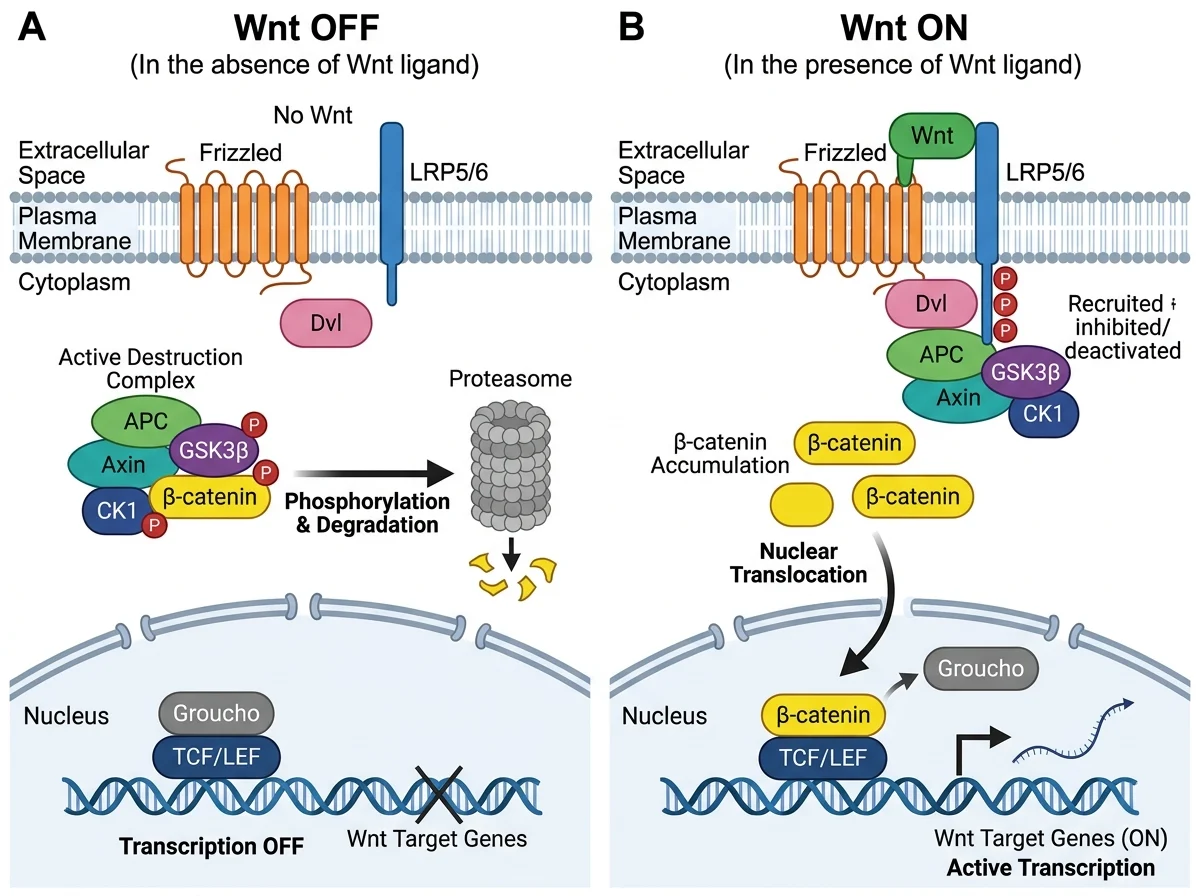
PaperBanana's output for the test prompt, unedited. We do not show the FigureLabs and BioRender figures because both were made on free plans, which do not allow publication.
PaperBanana as a FigureLabs alternative: what differs
The pictures were closer than we expected, so the choice comes down to how you work and what you pay.
- Editing. FigureLabs is built around a canvas: redraw a region, change text, split layers, export SVG or PPTX on a paid plan. PaperBanana edits by prompt in Edit an image, and converts a figure to an editable SVG. If you like to nudge things by hand, FigureLabs fits better.
- Speed. PaperBanana returned this figure in 23 seconds and FigureLabs in about a minute. That matters when you are trying ten versions of a prompt, and not at all when you need one figure.
- Entry price. FigureLabs is cheaper to start: $9 a month on the sale price we saw, against $26.90 a month for PaperBanana's Hobby plan.
- Price per image. A FigureLabs image costs 50 credits, which works out to about $0.45 on Starter and $0.26 on Plus. A PaperBanana image at 1K costs 5 to 10 credits, about $0.22 to $0.45 on Hobby. The two are in the same range.
- Paying without a subscription. PaperBanana sells one-time credit packs, and unused subscription credits roll over. See PaperBanana pricing.
- Use in publications. FigureLabs ties publication rights to its paid plans. PaperBanana allows commercial use of generated images. Whichever tool you use, your journal's policy on AI-generated figures decides whether you may submit the figure, so read it first.
Who should use FigureLabs
- Use FigureLabs if you want to generate a figure and then keep working on it by hand in the same place, or if you need SVG or PPTX files and are willing to pay for them.
- Try PaperBanana if you want finished images fast, prefer to buy credits once, or draw mostly method and pipeline diagrams. You can start in the generator or with the AI biology diagram maker.
- Stay with BioRender if you need a figure made only of curated, individually editable icons and your lab already pays for it.
Whatever you choose, check every label, arrow and compartment against your own knowledge of the biology. All three tools drew a textbook pathway well. None of them knows what your experiment showed.
FAQ
Is FigureLabs free?
There is a free plan. In our account on November 12, 2026 it gave 50 credits a day, which paid for one generated illustration. Free figures export at 1K as raster images and, according to the pricing page, are for non-commercial use only.
How much does FigureLabs cost?
On November 12, 2026 the pricing page showed Starter at $9, Plus at $26 and Pro at $74 a month, with 1,000, 5,000 and 20,000 credits. Those were sale prices next to list prices of $10, $35 and $99.
Can I publish a figure made on the FigureLabs free plan?
Not according to the pricing page, which limits free plans to non-commercial use and lists publication rights under the paid plans. Your journal's policy on AI-generated figures applies as well.
What is a good FigureLabs alternative?
For AI-generated research figures, PaperBanana and BioRender's AI assistant produced a comparable figure from the same prompt in our test. PaperBanana was the fastest, BioRender gave the most editable result, and FigureLabs gave the most polished image.