Short answer: BioRender's free plan lets you build a figure, but not publish it. In our test the free export was a 72 DPI PNG with a watermark. If you need a figure for a paper and do not want to pay $35 or more a month, your realistic alternatives are an AI figure generator such as PaperBanana or FigureLabs, or free icon libraries combined with a vector editor such as Inkscape. If your lab already pays for BioRender, it is still the best tool for a figure built from individually editable icons.
People look for BioRender alternatives for two reasons: the price, and a free plan that stops short of a usable export. This post covers both. We make PaperBanana, one of the alternatives listed here, so weigh our view accordingly. The BioRender facts below come from its pricing page and from a free account we used on November 12, 2026, and we say which is which.
Is BioRender free? What the free plan allows
From BioRender's pricing page on November 12, 2026:
- Up to three figures, one graphing file and some free AI credits.
- No commercial use or publication. A figure made on the free plan may not go into a paper.
- High-resolution export without a watermark is listed under the paid Individual plan, not under Free.
What we saw in the product on the same day:
- Export. The export window offered PNG at 72 DPI. Transparent background, watermark removal and the publication licence checkbox each carried the paid-plan crown.
- Watermark. The canvas carried a "Created in BioRender.com" mark in the corner.
- Object count. The free canvas showed a counter of 50 objects. The one figure we generated with BioRender's AI assistant contained 77 objects, and the counter turned red with an Upgrade button. We did not test what is blocked past the limit.
The free plan is good for learning the tool and for drafts you will not share. It does not produce a figure you can submit.
What BioRender costs
Prices from BioRender's pricing page on November 12, 2026. Check the page before you buy.
| Plan | Price | Notes |
|---|---|---|
| Free | $0 | Up to 3 figures, no publication or commercial use |
| Individual, academic | $35 a month billed yearly, or $39 monthly | Unlimited figures, high-resolution export, academic publishing rights |
| Lab, academic | $99 a month for 5 seats billed yearly | Shared folders, co-editing |
| Individual, industry | $95 a month billed yearly, or $115 monthly | Adds commercial usage rights |
BioRender's AI features are an add-on, listed from $4 a month for academic users. The page also mentions a student discount for people paying out of pocket, without giving the amount.
Where BioRender is still the better choice
It would be easy to write this post as if BioRender were only expensive. It is not. In our test its AI assistant asked sensible questions about the level of detail, proposed four layouts, and produced a clean, correct pathway figure in which every protein and arrow was a separate object that could be moved, recolored or replaced. No AI image generator we tested, ours included, gives you that from a prompt.
Keep BioRender if:
- your lab or institution already pays for it;
- you need to adjust figures element by element, repeatedly, over the life of a project;
- reviewers or collaborators expect its visual style.
BioRender alternatives by type
AI figure generators
You describe the figure in words and get an image back. These are fast and need no drawing skill. The result is a picture, so changing one element usually means prompting again or using an edit tool.
- PaperBanana. Generates research figures from a text description, edits them by prompt, and can convert an image to an editable SVG. Paid plans start at $26.90 a month, and one-time credit packs are available. Start with the AI biology diagram maker or the graphical abstract maker.
- FigureLabs. Generates illustrations that open on an editing canvas, with SVG and PPTX export on paid plans, which started at $9 a month on its pricing page when we checked. See our FigureLabs review for what its free plan covers.
Free icon libraries with a vector editor
This is the closest free replacement for the way BioRender works: you place ready-made icons and draw the arrows yourself. It costs time, not money.
- Bioicons collects open-licensed science icons. Licences differ from icon to icon, so check each one and credit it where required.
- Servier Medical Art and NIH BioArt offer medical and biological illustrations for reuse; read the licence terms on each site.
- Inkscape is a free vector editor that opens SVG icons and exports PDF, SVG and high-resolution PNG.
Tools you already have
PowerPoint or Keynote with shapes and imported SVG icons is enough for a simple schematic, and every co-author can open the file. It gets slow for dense pathway figures.
Same prompt in BioRender, FigureLabs and PaperBanana
We gave one prompt to all three, with default settings, once each:
Draw the canonical Wnt/β-catenin signaling pathway in two side-by-side panels: "Wnt OFF" (destruction complex degrades β-catenin) and "Wnt ON" (β-catenin accumulates, enters the nucleus and activates TCF/LEF target genes). Label Frizzled, LRP5/6, Dishevelled, Axin, APC, GSK3β, CK1.
One run per tool is a small sample, so read this as an example and not as a ranking.
| BioRender (free) | FigureLabs (free) | PaperBanana | |
|---|---|---|---|
| Time to a finished image | About 5 minutes of generation, with two steps that wait for you | About 1 minute | 23 seconds |
| All seven requested labels present | Yes | Yes | Yes |
| Errors we could see | None | None | One unlabeled β-catenin shape and one stray symbol |
| Editable result | Yes, every element | Canvas tools, not tested | Edit by prompt, or convert to SVG |
| Could we export it for a paper on the free plan? | No: 72 DPI, watermark, no publication rights | No: 1K raster, non-commercial only | Free sign-up credits are limited; paid images may be used commercially |
BioRender's assistant reported about 1 minute for its questions, 2 minutes for the sketches and 1.5 minutes for the color draft, then converted the draft to editable objects. All three figures showed the same biology correctly at the level of a textbook diagram. PaperBanana's was the fastest and the only one with visible flaws.
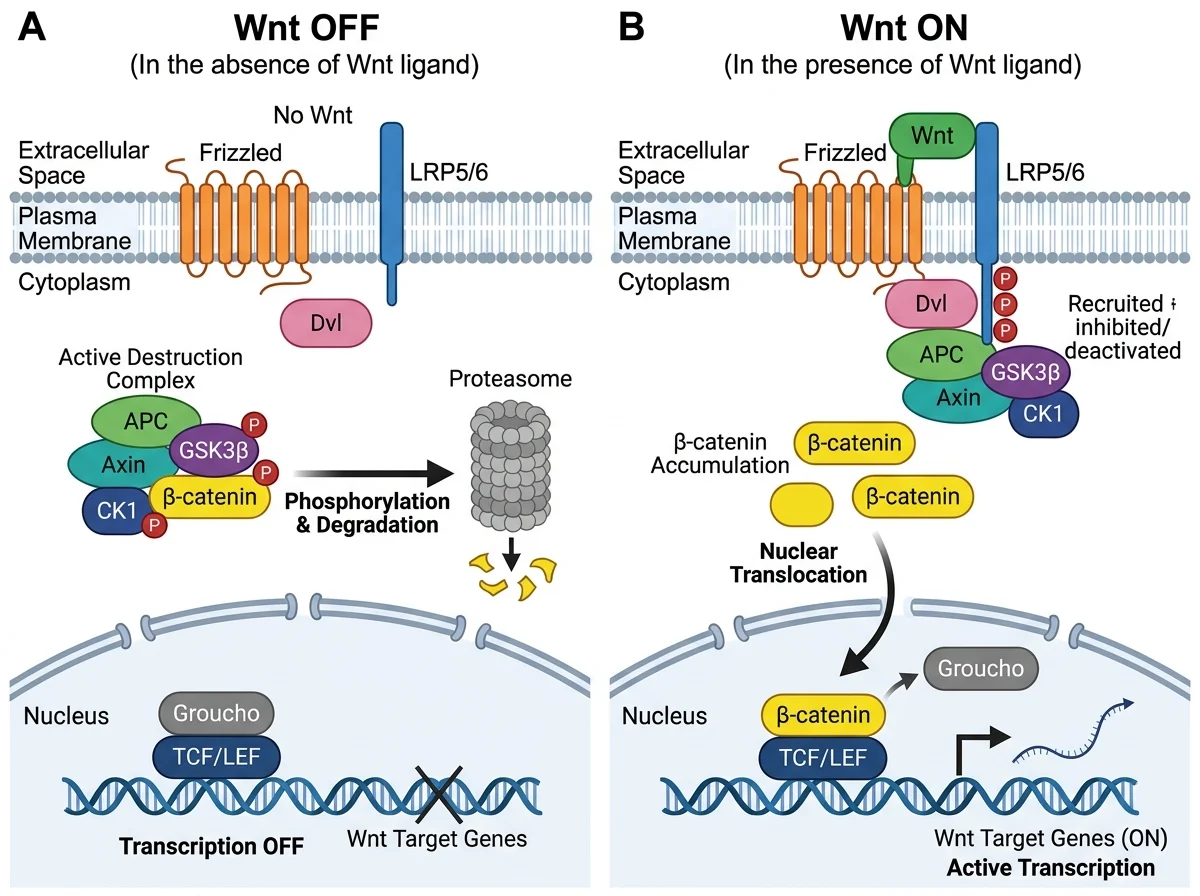
PaperBanana's output for the test prompt, unedited. We do not show the BioRender and FigureLabs figures because both were made on free plans, which do not allow publication.
How to choose
- A figure for a paper, and the lab pays for BioRender: use BioRender.
- A figure for a paper, no budget, some time: icons from an open library, assembled in Inkscape. Keep a list of the licences.
- Lab meeting slides, a first draft, or a graphical abstract due tomorrow: an AI generator. Check every label before you show it to anyone.
- Many method or pipeline diagrams: an AI generator handles these well, and BioRender's icon library helps less. Try the PaperBanana generator.
Two cautions apply to every option. Check the figure against the biology yourself, because a tool that draws a textbook pathway correctly knows nothing about your result. And read your target journal's policy on AI-generated images before you submit one.
FAQ
Is there a BioRender free plan?
BioRender has a free plan with up to three figures. Its pricing page says the free plan does not allow publication or commercial use, and in our test the free export was a 72 DPI PNG with a watermark.
What is the best free BioRender alternative?
For a figure you can publish at no cost, combine an open icon library such as Bioicons with the free vector editor Inkscape, and follow each icon's licence. AI generators are faster but usually charge for regular use.
Can I use BioRender figures in a publication?
On a paid plan, yes: the academic Individual plan lists academic publishing rights. On the free plan, no.
How much does BioRender cost for students?
The pricing page mentions a student discount for people who pay out of pocket and sign up with an academic email, but it does not state the price. The standard academic Individual plan was $35 a month billed yearly on November 12, 2026.