Short answer: for a final research figure with many labels, use Nano Banana 2.1. Use Nano Banana 2 when you want fast drafts. Keep Nano Banana Pro for the hardest compositions, where you are willing to pay the highest price per image. The rest of this post explains why, with Google's published specs and the numbers we measured ourselves.
Google now offers three Nano Banana models that overlap a lot. Nano Banana Pro came first, Nano Banana 2 brought most of its quality to the faster Flash tier, and Nano Banana 2.1 (released October 6, 2026) is an update to Nano Banana 2. If you only want to know what 2.1 does on paper figures, read our Nano Banana 2.1 test on academic figures. This post is about choosing between the three.
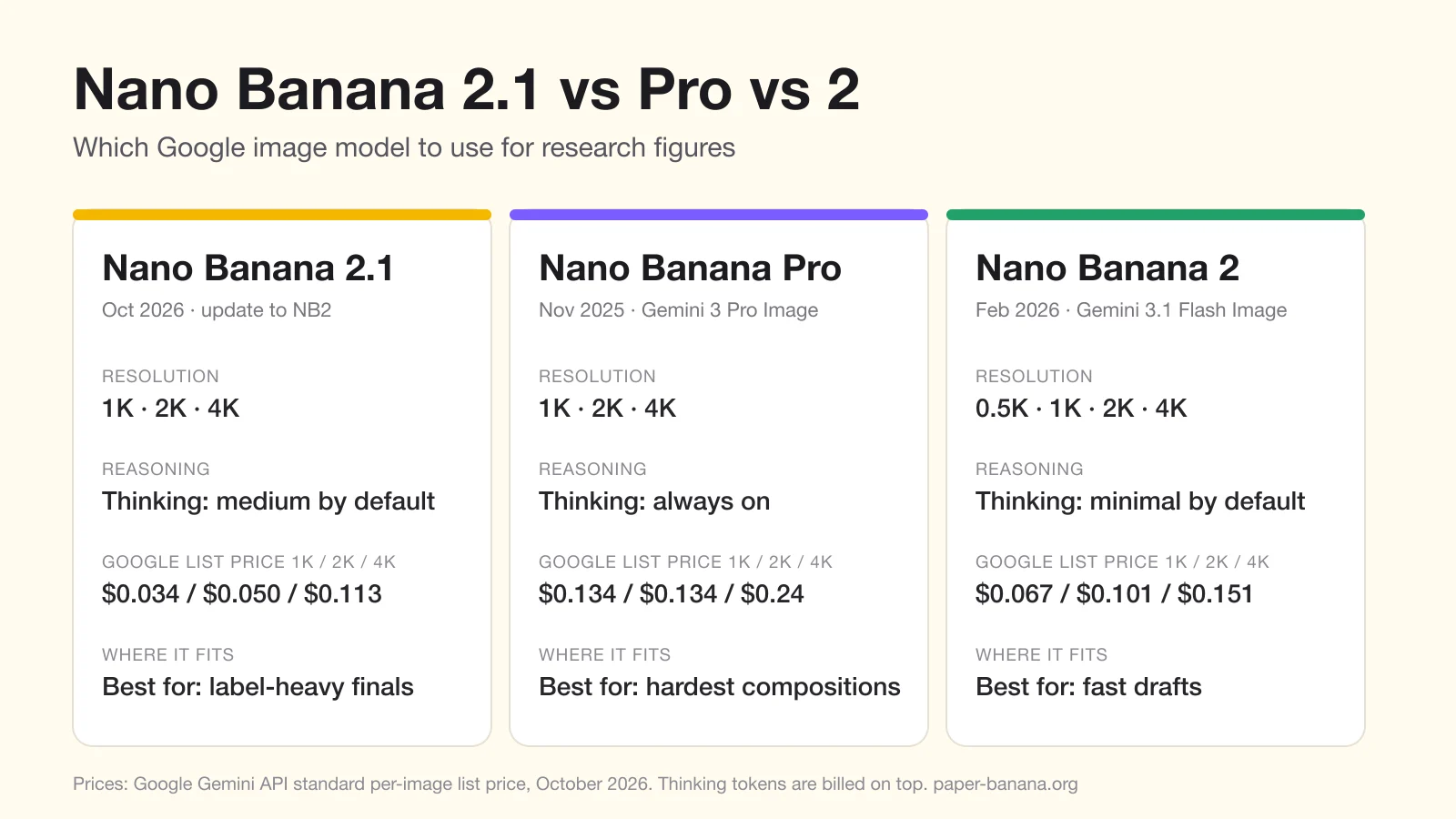
The three models at a glance
| Nano Banana 2.1 | Nano Banana Pro | Nano Banana 2 | |
|---|---|---|---|
| Google model | Gemini Nano Banana 2.1 | Gemini 3 Pro Image | Gemini 3.1 Flash Image |
| API model ID | gemini-nano-banana-2.1 | gemini-3-pro-image | gemini-3.1-flash-image |
| Released | October 2026 | November 2025 | February 2026 |
| Output sizes | 1K, 2K, 4K | 1K, 2K, 4K | 0.5K, 1K, 2K, 4K |
| Thinking | Minimal, medium or high (medium by default) | Always on | Minimal or high (minimal by default) |
| Google's own description | "An update to Nano Banana 2" and "the more efficient counterpart" to Pro | "The premium choice for the most complex visual tasks" | "Previous-generation high-efficiency workhorse" |
Sources: Google's Gemini API model pages and image generation guide, checked on October 20, 2026. Google's guide now recommends Nano Banana 2.1 over Nano Banana 2 for new projects.
Same prompt, three models: our test
On October 20, 2026 we sent the same three research-figure prompts to all three models through Google's API, at 1K and 16:9 with default settings, one image per model. The times are wall-clock seconds per image.
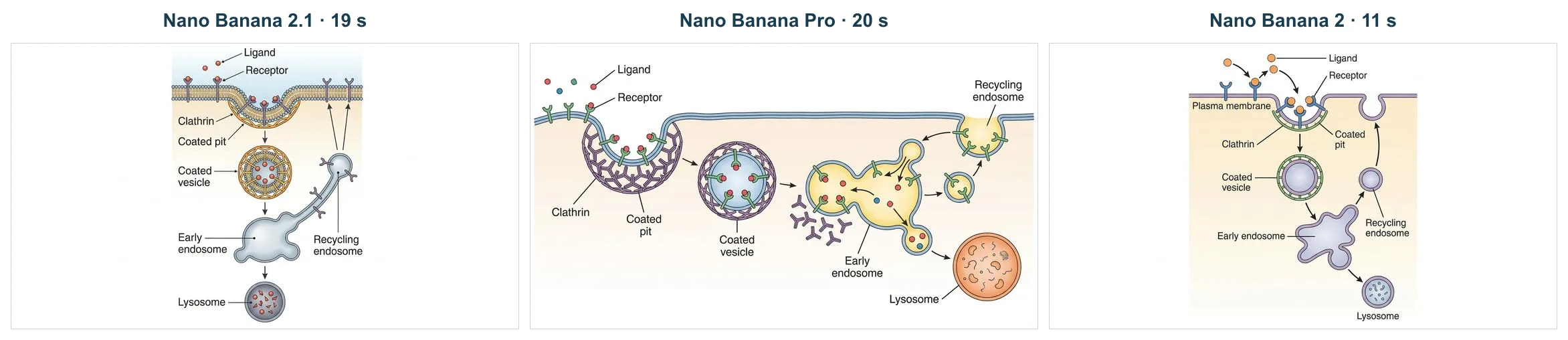
Labeled mechanism with eight required labels. All three models spelled every label correctly. Nano Banana 2 added a "Plasma membrane" label although the prompt asked for no other text. Nano Banana 2.1 and Nano Banana 2 drew a tall diagram in the middle of the frame and left wide empty margins; Pro used the full 16:9 width.
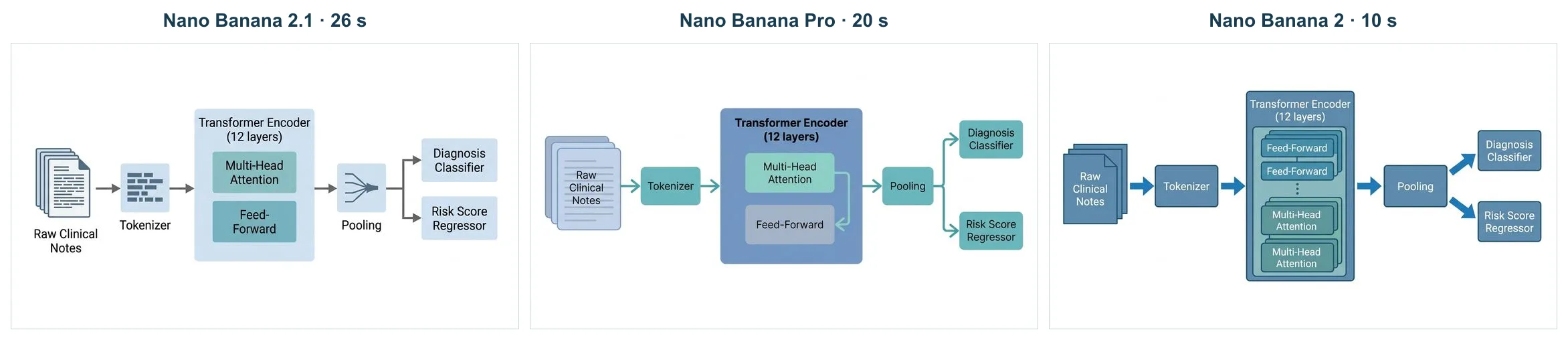
Method pipeline. Nano Banana 2.1 and Pro followed the prompt exactly. Nano Banana 2 drew the Feed-Forward and Multi-Head Attention blocks twice each and put Feed-Forward first.
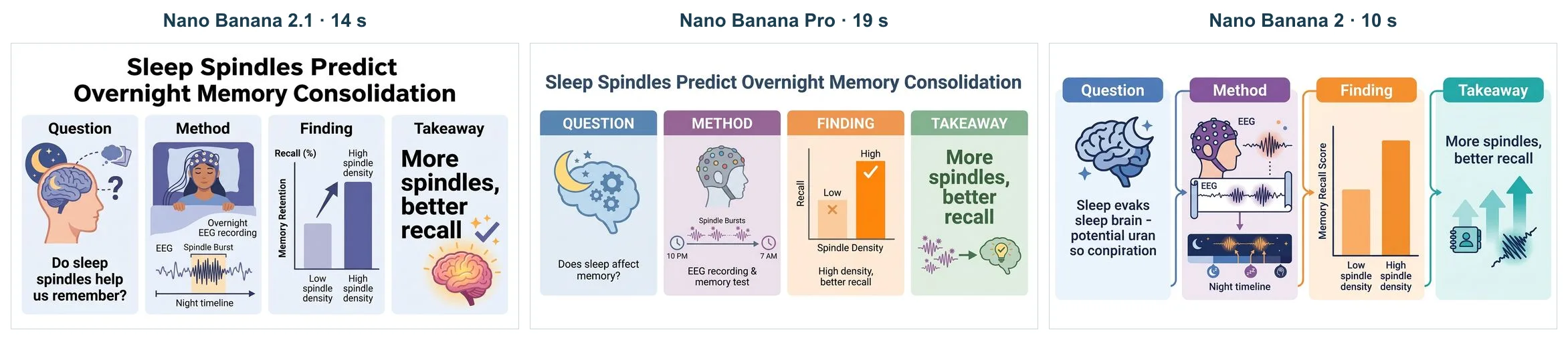
Graphical abstract. Nano Banana 2.1 and Pro wrote the title, the four headings and every sentence correctly. Nano Banana 2 garbled the text in the Question panel and left out the title. Nano Banana 2.1 repeated the "High spindle density" label on its chart.
| Same-prompt test, 1K | Nano Banana 2.1 | Nano Banana Pro | Nano Banana 2 |
|---|---|---|---|
| Time per image | 14–26 s | 19–20 s | 10–11 s |
| Thinking tokens per image | 750–1,283 | 240–371 | none reported |
| Figures with no text or layout error | 2 of 3 | 3 of 3 | 0 of 3 |
Three prompts with one image each is a small sample, so read this as an example rather than a benchmark. It matches the overall picture, though: Nano Banana 2 is the fastest but makes the most mistakes, and Nano Banana 2.1 and Pro are close on accuracy, with 2.1 at a much lower price.
Nano Banana 2.1 vs Nano Banana Pro
These two are the ones most people weigh for a final figure.
- Price. At Google's list prices, Nano Banana 2.1 costs $0.0336 per 1K image and $0.113 per 4K image. Nano Banana Pro costs $0.134 per 1K or 2K image and $0.24 per 4K image. Even after adding 2.1's thinking tokens (see below), 2.1 costs roughly half of Pro or less at every size.
- Text in the image. Google says 2.1 improves text rendering over Nano Banana 2. In our own tests, 2.1 wrote dense labels without garbling them and fixed a misspelled label in an edit. In our same-prompt test above, both 2.1 and Pro spelled every label correctly, and Pro followed the layout slightly more closely.
- Reasoning. Both think before they draw. With 2.1 you can choose how much: minimal, medium or high. Pro's thinking cannot be switched off.
- When Pro still makes sense. Google positions Pro as the model for the most complex visual tasks. If a crowded multi-panel figure keeps coming out wrong on 2.1, try Pro before you rewrite the prompt.
For most paper figures, start with 2.1. It is cheaper and newer, and Google built it as the efficient alternative to Pro.
Nano Banana 2.1 vs Nano Banana 2
This is an upgrade decision, since 2.1 is an update to Nano Banana 2.
- Speed. Nano Banana 2 is faster. In our same-prompt test 2.1 took 14–26 seconds per 1K image and Nano Banana 2 took 10–11 seconds; earlier tests with longer prompts measured 21–46 and 14–20 seconds. The difference comes from thinking: 2.1 defaults to medium, Nano Banana 2 to minimal.
- Quality. Google reports better visual quality, prompt adherence and text rendering for 2.1. In our infographic test, Nano Banana 2 produced a garbled label and 2.1 did not.
- Editing. 2.1 returned edited figures at the size we uploaded and kept dense text readable. Nano Banana 2 also kept the size on our three test edits.
- Shapes. Both models support tall and wide ratios such as 1:4, 4:1, 1:8 and 8:1. 2.1 also accepts 9:21, which suits a tall poster column.
- Smallest size. Nano Banana 2 offers 0.5K output; 2.1 starts at 1K.
Pick Nano Banana 2 while the layout is still changing and you want many quick drafts. Switch to 2.1 for the version that goes into the paper.
Nano Banana Pro vs Nano Banana 2
Before 2.1 existed, this was the main choice. Nano Banana 2 brought much of Pro's quality to the faster Flash tier at about half Pro's 1K price ($0.067 against $0.134). Pro remains the slower, premium option. Now that 2.1 is out, the comparison matters less: for a final figure, 2.1 is usually the better trade than either.
What it really costs
Google's list price is not the whole bill. Thinking tokens are charged separately as text output, so a model that thinks more costs more than its per-image price.
| Google API, standard tier | 1K | 2K | 4K |
|---|---|---|---|
| Nano Banana 2.1, list price | $0.0336 | $0.0504 | $0.113 |
| Nano Banana 2.1, our measured cost with default thinking | about $0.045 | about $0.06–0.07 | about $0.12 |
| Nano Banana Pro, list price | $0.134 | $0.134 | $0.24 |
| Nano Banana 2, list price | $0.067 | $0.101 | $0.151 |
Prices are from Google's Gemini API pricing page. One 4K image from 2.1 used 3,780 image tokens in our test. Some articles quote $0.0756 for a 2.1 image; that does not match Google's price table.
Price on PaperBanana
On PaperBanana you pay in credits, and failed generations are not charged.
| Credits per image (1K / 2K / 4K) | List price | Basic | Pro |
|---|---|---|---|
| Nano Banana 2.1 | 10 / 20 / 40 | 10 / 10 / 20 | 10 / 10 / 10 |
| Nano Banana Pro | 10 / 20 / 40 | 10 / 10 / 20 | 10 / 10 / 10 |
| Nano Banana 2 | 5 / 10 / 20 | 5 / 5 / 10 | 5 / 5 / 5 |
Nano Banana 2.1 costs the same as Nano Banana Pro and is available on the Basic and Pro plans. Nano Banana 2 and Nano Banana Pro are open to every plan. Nano Banana 2.1 also works in the Advanced pipeline and in Edit an image; Nano Banana Pro is only offered in the Standard generator.
Which one should you pick?
| Your task | Our pick |
|---|---|
| Quick drafts while the layout keeps changing | Nano Banana 2 (or Nano Banana 2 Lite for the cheapest drafts) |
| Final method diagram or infographic with many labels | Nano Banana 2.1 |
| Fixing a label or color in an existing figure | Nano Banana 2.1 in Edit an image |
| A very crowded figure that 2.1 keeps getting wrong | Nano Banana Pro |
| A tall poster panel or a wide banner | Nano Banana 2.1 or Nano Banana 2 |
| A plot of measured data | A plotting tool, not an image model |
Whichever you choose, read every label, arrow and number before the figure goes into a manuscript.
FAQ
Is Nano Banana 2.1 better than Nano Banana Pro? Google describes 2.1 as the more efficient counterpart to Pro, not as a replacement. It costs far less per image and supports adjustable thinking. Pro is still Google's premium model for the most complex scenes.
Is Nano Banana 2.1 the same as Nano Banana 2? No. 2.1 is an update to Nano Banana 2 with better text rendering and prompt adherence. It thinks more by default, so it is slower.
Why is Nano Banana 2.1 slower than Nano Banana 2? It reasons at medium level by default before drawing. Nano Banana 2 defaults to minimal thinking.
Does the temperature setting change Nano Banana 2.1 results? In our API tests the model accepted a temperature value but ignored it, so do not rely on it for variation. Change the prompt instead.
Try it
Open the generator with Nano Banana 2.1 selected and run the same prompt on Nano Banana 2 to compare. If you are on the free or Hobby plan, the pricing page shows what Basic and Pro include. For prompt ideas, see our Nano Banana guide for scientific figures.