Short answer: GPT Image 2.6 draws more complete, more detailed figures than GPT Image 2.5, but it takes about 10 seconds longer and costs more credits. It also tends to add a title and explanatory text you did not ask for. Use 2.6 for the final version of a figure, and keep 2.5 for drafts and for figures where you need tight control over every label.
GPT Image 2.6 is OpenAI's newest image model. It has been available on PaperBanana since November 5, 2026, as GPT Image 2.6 Sunburst in the model menu, on the Basic and Pro plans. This post shows what it does differently on research figures, using the same prompts on both models.
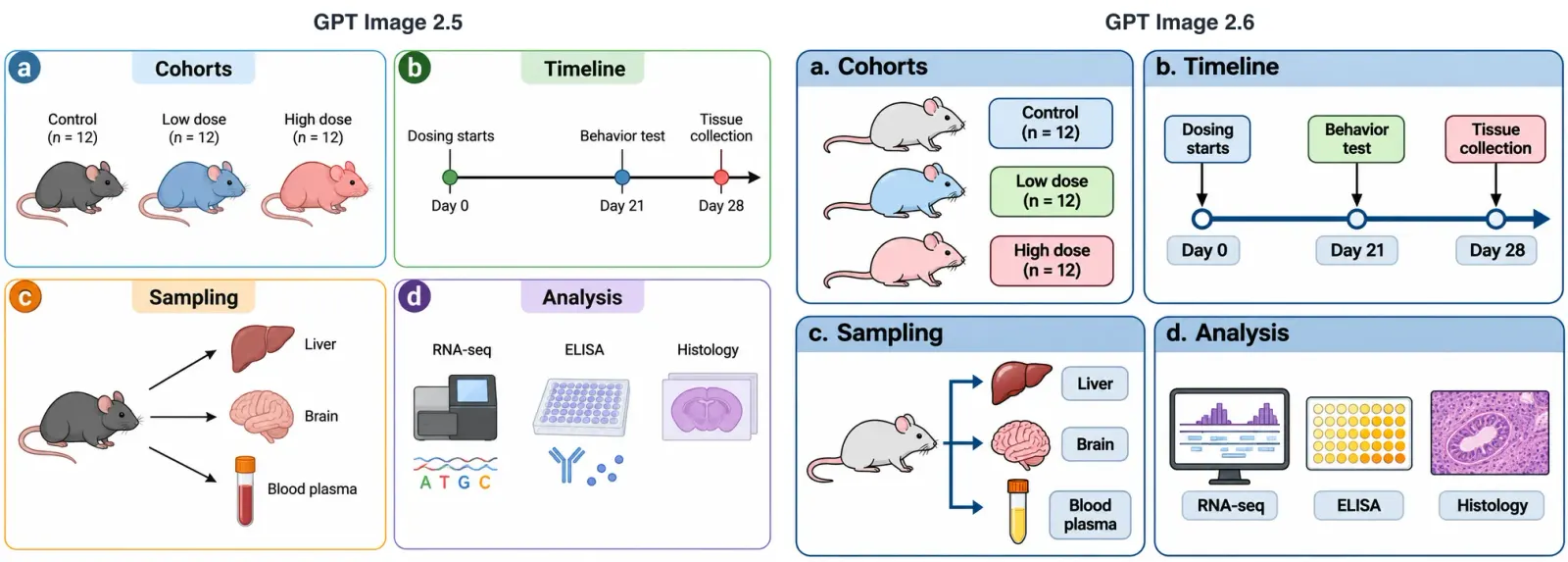
What's new in GPT Image 2.6 on PaperBanana
- More detail per image. 2.6 renders noticeably more detail than 2.5: textured micrographs, boxed labels, and extra structure such as legends and axes.
- Closer to complex layouts. In our pipeline test it drew every connection the prompt described, including side inputs that skip several steps.
- Labels in the language of your prompt. On PaperBanana we tell 2.6 explicitly which language your description is written in, so English prompts get English labels and Chinese prompts get Chinese labels. All 8 of our 2.6 images used the right language. After this test we do the same for 2.5 (see the pipeline test below).
- No company logos. Without guidance, both GPT Image models tend to decorate a "large language model" box with a real company logo. PaperBanana adds an instruction against this to every 2.6 request, and none of our 2.6 images had a logo. After this test we added the same instruction to 2.5. If you explicitly ask for a logo, you still get one.
- Slower. About 25–35 seconds per image in our test, against 14–18 seconds for 2.5.
Same prompt, two models: our test
On November 9, 2026 we sent four research-figure prompts to GPT Image 2.5 and GPT Image 2.6 through the same request path PaperBanana uses, at HD quality and 1536×1024. We ran each prompt twice on each model (16 images in total) and read every label. The pairs below are from the first run; we note where the second run differed.
1. Mechanism diagram: insulin signaling
The prompt listed six steps of insulin signaling in a muscle cell and asked for "exactly these labels plus the step numbers".
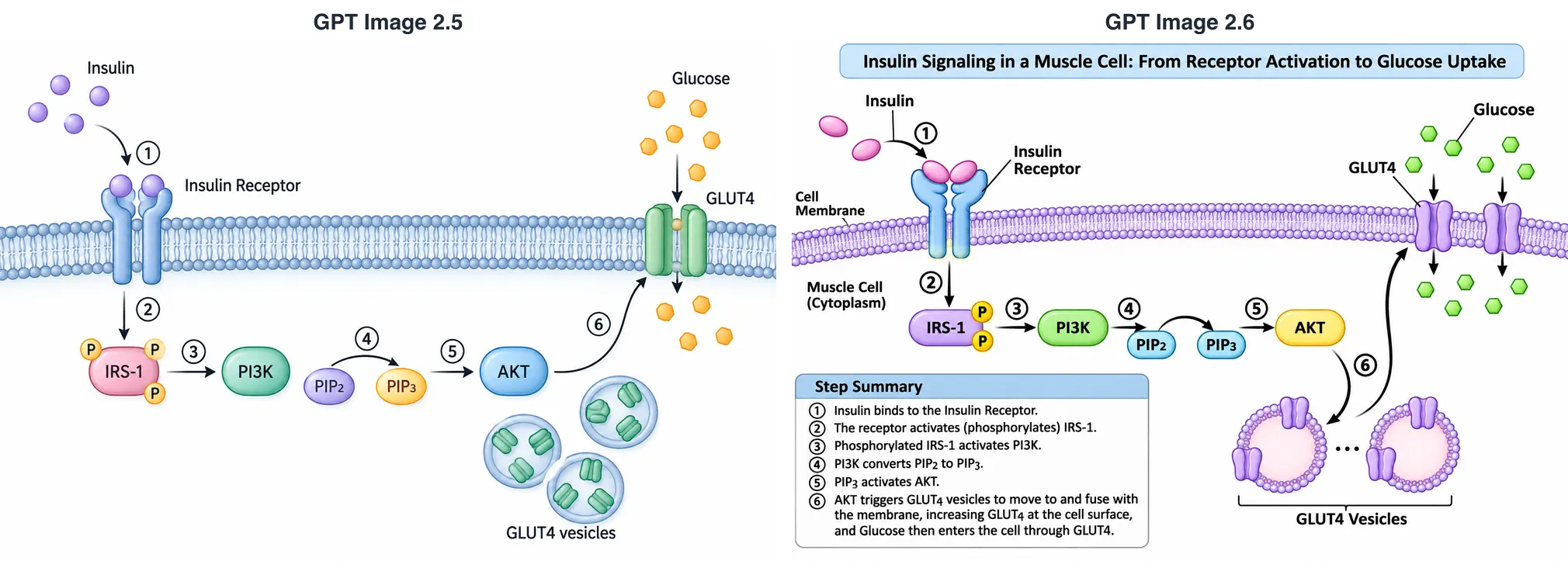
Verdict: mixed. Both models spelled every label correctly and put steps 1–6 in the right order. GPT Image 2.6 drew the full mechanism, with AKT sending GLUT4 vesicles to the membrane, and more transporters letting glucose in. In this run, 2.5 drew the vesicles but did not connect them to anything (its second run did). On the other hand, 2.6 ignored "exactly these labels": in both runs it added a title, "Cell Membrane", "Muscle Cell (Cytoplasm)" and a step-by-step summary box. If you want a figure that explains itself, that is useful. If your caption already does that, 2.5 followed the instruction and 2.6 did not.
2. Multi-panel experiment schematic
A 2×2 design figure for a mouse study: cohorts, a 28-day timeline, tissue sampling and analysis methods.
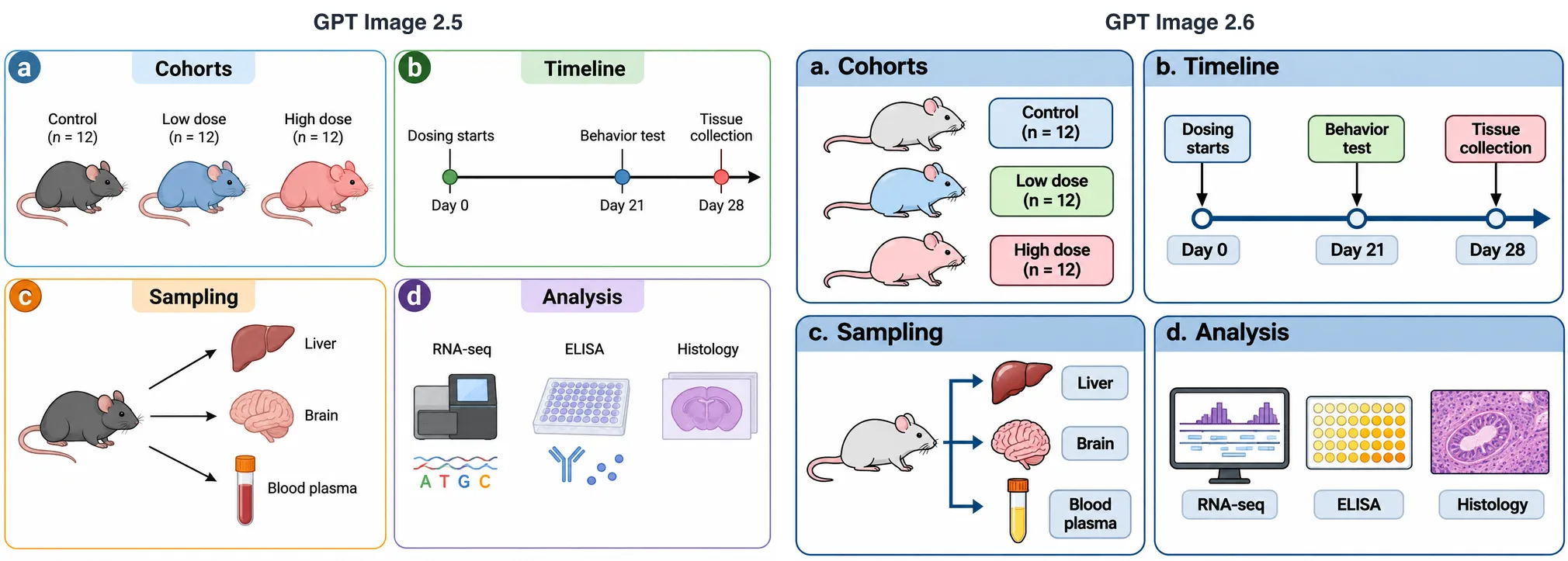
Verdict: close, with one point to each. Both models got every label and every group size right in both runs. 2.6 drew the plasma tube yellow, as plasma actually is (2.5 drew red whole blood in both runs), and its histology icon looks like a real stained section. 2.5 placed Day 21 closer to Day 28 on the timeline, roughly to scale; 2.6 spaced the three time points evenly both times. The visual style is a matter of taste: 2.6 uses heavier boxes and bolder text, 2.5 is lighter.
3. Chinese labels: a multimodal model pipeline
The prompt was written in Chinese and described a multimodal emotion-recognition model with text, audio and video encoders, cross-modal attention fusion, a classifier and a loss term.
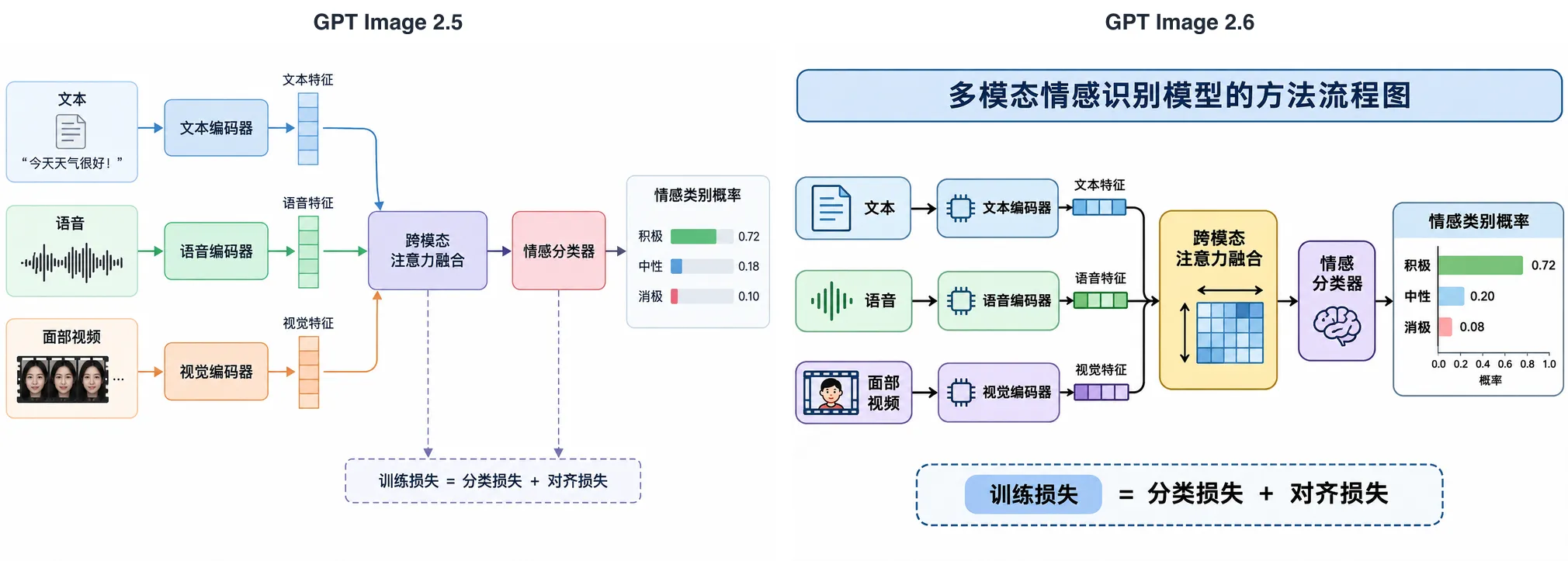
Verdict: both good. Both models wrote every Chinese label correctly in both runs, so this prompt did not separate them. 2.6 again added a title that was not requested, plus an axis under the probability chart. 2.5 used photo-like faces for the video input in both runs, which you may not want in a paper figure; 2.6 drew a simple cartoon face.
4. Pipeline diagram: retrieval-augmented generation
A seven-stage RAG pipeline with a dashed "Index refresh" feedback arrow, where the language model receives both the user query and the retrieved passages.
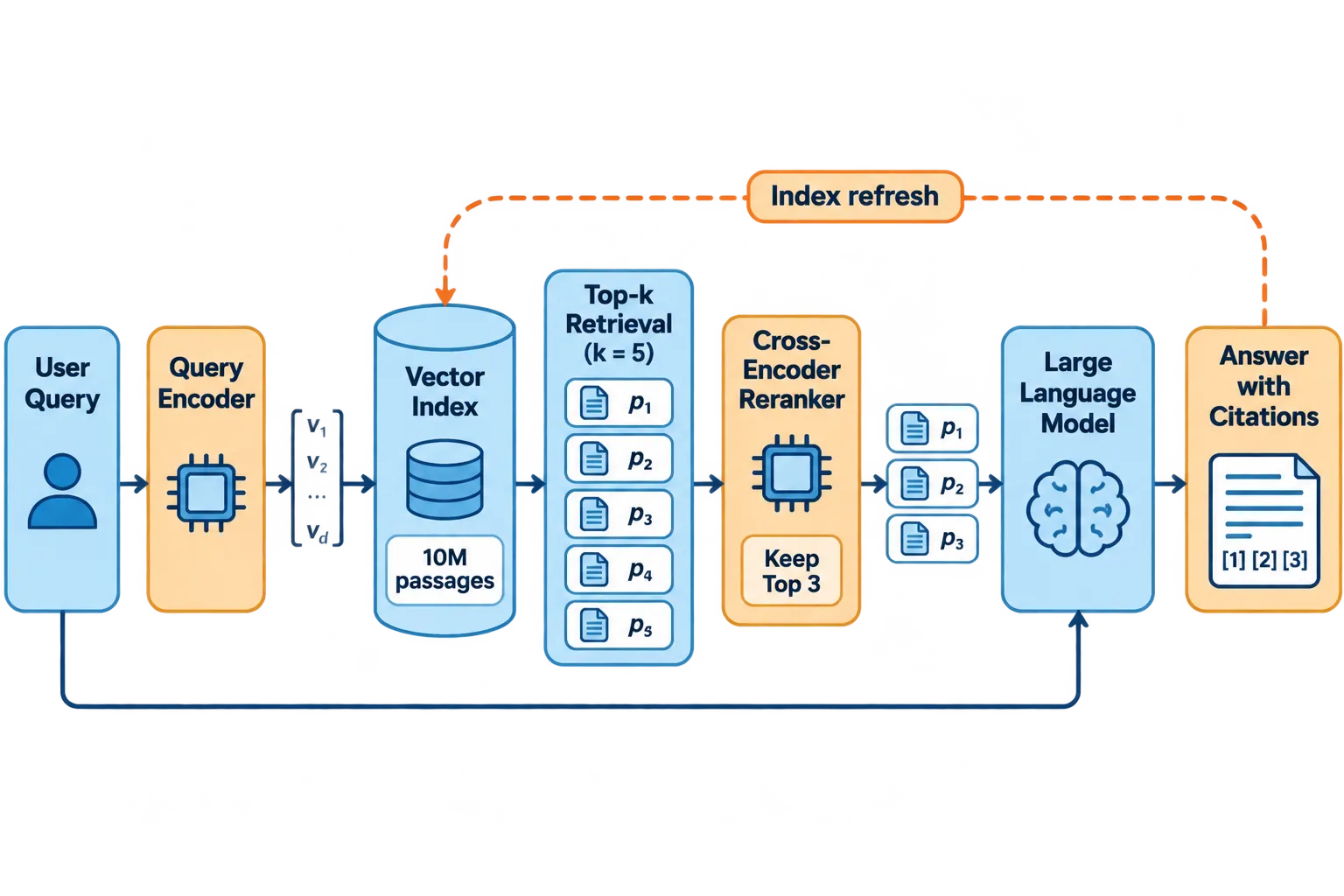
Verdict: 2.6 was better here, and the test changed how we run 2.5. In both runs 2.6 drew all seven stages, the feedback arrow and the extra arrow carrying the user query to the language model, and it used a plain brain icon for the model. GPT Image 2.5 drew an OpenAI-style logo inside the "Large Language Model" box in both runs, and it wrote the labels in Chinese although the prompt was in English. Both came from how PaperBanana prompted 2.5 at the time: it did not get the no-logo instruction or the explicit language name that 2.6 gets. We have since added both to 2.5. We re-ran this prompt three times on 2.5 with the new instructions: all labels came out in English, the model box had a plain brain icon, and none of the three had a logo. Our Chinese prompt still produced Chinese labels on 2.5 (2 of 2 runs).
Summary of the test
| GPT Image 2.5 | GPT Image 2.6 | |
|---|---|---|
| Label spelling errors | none found | none found |
| Added text that wasn't requested | a sample sentence on 1 of 4 prompts | a title or summary box on 2 of 4 prompts, in both runs |
| Company logo in the RAG figure | 2 of 2 runs (0 of 3 after the fix) | 0 of 2 runs |
| Time per image in this test | 14–18 s (median about 17 s) | 25–34 s (median about 27 s) |
Sixteen images is a small sample, so read this as a set of examples, not a benchmark. Both models made far fewer text errors than older image models; the differences were mostly in completeness, extra text and style.
Speed and credits
| On PaperBanana | GPT Image 2.5 | GPT Image 2.6 |
|---|---|---|
| Default quality | 5 credits | 8 credits |
| HD quality | 15 credits | 20 credits |
| Typical time per image | about 20 s | about 30–35 s, up to about 55 s |
| Plans | all plans | Basic and Pro |
In Edit an image, the GPT Image 2.6 option costs 20 credits per edit. The typical times are what we see across real generations on the site; our own test above was a little faster. 2.6 is slower because it renders more detail, so expect to wait up to about a minute for a crowded figure. Failed generations are not charged.
GPT Image 2.6 vs 2.5 vs Nano Banana 2.1: which one?
| Your task | Our pick |
|---|---|
| Quick drafts while the layout keeps changing | GPT Image 2.5 (Default quality) |
| A figure where every label must match your list, with nothing added | GPT Image 2.5, or 2.6 with "no title, no extra text" in the prompt |
| Final method or pipeline diagram with many connections | GPT Image 2.6 |
| A figure that should explain itself (teaching slides, posters) | GPT Image 2.6 |
| Fixing a label or color in an existing figure | GPT Image 2.6 or Nano Banana 2.1 in Edit an image |
| Very wide or tall shapes, or 2K/4K output | Nano Banana 2.1 |
Nano Banana 2.1 is Google's model and is also limited to Basic and Pro. Our Nano Banana 2.1 vs Pro comparison and the Nano Banana 2.1 academic figure test cover it in detail. If one model keeps getting a figure wrong, running the same prompt on the other is often faster than rewriting the prompt.
Whichever model you use, read every label, arrow and number before a figure goes into a manuscript.
FAQ
Is GPT Image 2.6 better than GPT Image 2.5? For final figures, usually yes: it draws more complete layouts and more detail. It is slower, costs more credits, and is more likely to add a title or explanatory text you did not ask for.
How do I stop GPT Image 2.6 from adding a title? Say so in the prompt, for example "no title, no caption, no text other than the labels listed". In our test, "exactly these labels" alone was not enough.
Why is GPT Image 2.6 slower? It renders more detail per image. On PaperBanana a typical image takes 30–35 seconds, against about 20 seconds for 2.5.
Can I use GPT Image 2.6 on the free or Hobby plan? No. It is available on the Basic and Pro plans. GPT Image 2.5 remains available on every plan.
Try it
Open the generator with GPT Image 2.6 selected, then run the same prompt on GPT Image 2.5 to compare. If you are on the free or Hobby plan, the pricing page shows what Basic and Pro include.