
Paper Craft Skills
Paper Craft Skills turns an arXiv link or PDF into publication-grade method figures, visual slide decks, and deep-dive articles — zero config, one command, no API keys.
Last reviewed by the paperbanana team on Jul 13, 2026
Install
npx skills add zsyggg/paper-craft-skillsWhat is Paper Craft Skills?
Paper Craft Skills is a set of three Claude Code skills — paper-comic, paper-analyzer, and paper-deck — that turn an academic paper (arXiv link, local PDF, or pasted text) into method figures, a deep-dive article, or a visual slide deck. Unlike skills built around structured note-taking, Paper Craft Skills is oriented toward output you would show to other people: a diagram for a talk, an article to publish, or a deck for a lab meeting. Installation is a single natural-language request or an npx skills add command, with no API keys or accounts required, and it works across Codex, Claude Code, Cursor, and Windsurf.
paper-comic reads a paper, proposes a set of figures (for example, six figures covering the cover, architecture overview, key mechanism, and results), and waits for your confirmation on scope, language, and style — paper-figure for clean publication-grade diagrams, or sketchnote for a bright, hand-drawn study-notes look — before generating anything. paper-analyzer is described in the README as "not a paper translator — a re-interpreter": it reads the full paper, searches GitHub for open-source implementations, cross-references the code against the paper's claims, and writes in one of three styles — storytelling (blog-post style with hooks and analogies), academic (peer-review-style deep dive with KaTeX formulas and comparison tables), or concise (a Mermaid-diagram-plus-table cheat sheet).
paper-deck goes further than a typical slide generator: it first produces a deck brief and slide-by-slide outline, then writes a reproducible visual prompt for every individual slide, generates 16:9 slide images, and merges them into .pptx and .pdf exports. Because every slide has its own prompt, you can ask for precise edits like "make slide 5 more journal-like" or "replace slide 8 with a real benchmark chart," and the skill supports four style presets (journal-minimal, business-research, warm-notes, liquid-glass) plus mounting real figures, tables, or screenshots extracted from the source PDF into the deck instead of hallucinating visuals from scratch.
Core capabilities
paper-comic: paper to method figures
Reads a paper, proposes a slate of figures with scope/count suggestions, asks you to confirm language and style, then generates in either paper-figure (publication-grade) or sketchnote (hand-drawn, warm) style.
paper-analyzer: paper to deep article
Reads the full paper, searches GitHub for real implementations, cross-references code against the paper's claims, and writes an HTML article in storytelling, academic, or concise style, with KaTeX formulas and Mermaid diagrams.
paper-deck: paper to visual slide deck
Builds a deck brief and outline, writes a per-slide visual prompt, generates 16:9 slide images, and exports .pptx and .pdf, with four style presets and support for mounting real extracted figures/tables instead of generated ones.
Formula and code cross-referencing
paper-analyzer extracts formulas with symbol-by-symbol breakdowns and aligns paper concepts against discovered GitHub source code, output as an HTML article readable on mobile.
Iterative, per-slide editable output
Because paper-deck keeps a reproducible prompt per slide, individual pages can be regenerated or restyled ("keep the layout but switch the cover to liquid glass") without rebuilding the whole deck.
Zero-config, multi-host install
No API keys or accounts; installs via a single natural-language request to the agent or npx skills add zsyggg/paper-craft-skills, and works with Codex, Claude Code, Cursor, and Windsurf.
What you can use it for
Preparing lab-meeting or journal-club slides
Run /paper-deck https://arxiv.org/abs/1706.03762 --style journal-minimal --slides 12 to get a Nature/IEEE-inspired deck built from the paper's own figures and outline.
Producing a method diagram for a blog post or talk
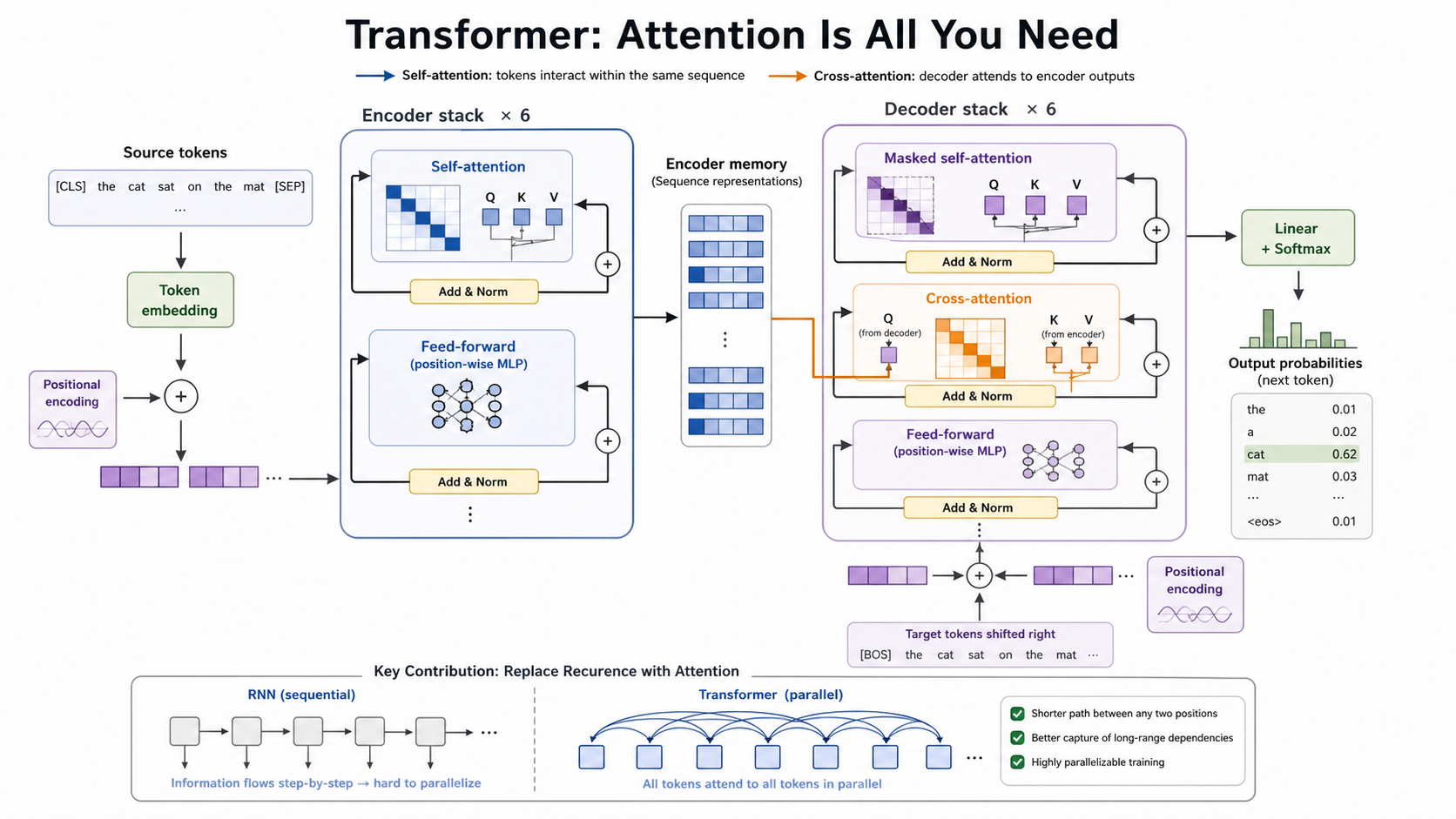
Run /paper-comic on a paper, review the proposed figure list, and generate a paper-figure-style architecture diagram for inclusion in a presentation or writeup.
Writing a deep-dive explainer with real code references
Run /paper-analyzer /path/to/paper.pdf in academic style to get a KaTeX-formula-annotated HTML article that cross-references the actual GitHub implementation of the method.
Making a fast, shareable summary for a team channel
Run /paper-analyzer in concise style to get a Mermaid-diagram-plus-table cheat sheet suitable for a quick internal share.
Building study notes in a warm, approachable style
Use paper-comic's sketchnote style or paper-deck's warm-notes preset to turn a paper into bright, hand-drawn-feeling visuals for personal study or teaching.
How to get started
- 1
Install the skill
Tell your agent "Please install zsyggg/paper-craft-skills for me. GitHub: https://github.com/zsyggg/paper-craft-skills" or run npx skills add zsyggg/paper-craft-skills from a terminal — the agent handles clone, symlink, and registration automatically.
- 2
Pick the skill for your output
Use /paper-comic for figures, /paper-analyzer for a written deep dive, or /paper-deck for a slide deck, passing an arxiv link, local PDF path, or pasted text/notes.
- 3
Confirm scope, style, and language
For paper-comic, review the proposed figure list and reply with your chosen scope, style (paper-figure or sketchnote), and language (Chinese or English) before generation runs.
- 4
Iterate on individual outputs
For paper-deck, request precise per-slide changes ("make slide 5 more journal-like," "replace slide 8 with a real benchmark chart") — each slide's prompt is regenerated independently rather than rebuilding the whole deck.
How it compares to similar skills
Paper Craft Skills is aimed at producing shareable visual and written output from a paper you have already found, not at deep structured note-taking or literature review. Pair it with these if your need is different.
DeepPaperNote
Pick DeepPaperNote if your goal is a structured, evidence-grounded Obsidian research note for your own long-term knowledge base rather than a shareable figure, article, or deck.
PaperOrchestra
Pick PaperOrchestra if you are writing a new paper from your own research rather than turning an existing published paper into figures or explainer content.
Academic PPTX Skill
Pick Academic PPTX Skill if you need a general academic-slide-deck builder not specifically tied to per-paper visual prompt generation and PDF figure mounting.