
Claude Prism
An offline-first desktop LaTeX workspace built on Claude — local file storage, embedded Tectonic compilation, and 100+ installable scientific skills.
Last reviewed by the paperbanana team on Jul 13, 2026
Install
Download the prebuilt desktop app for your OS from https://github.com/delibae/claude-prism/releases/latest (macOS Apple Silicon/Intel .dmg, Windows .exe, or Linux .AppImage).What is Claude Prism?
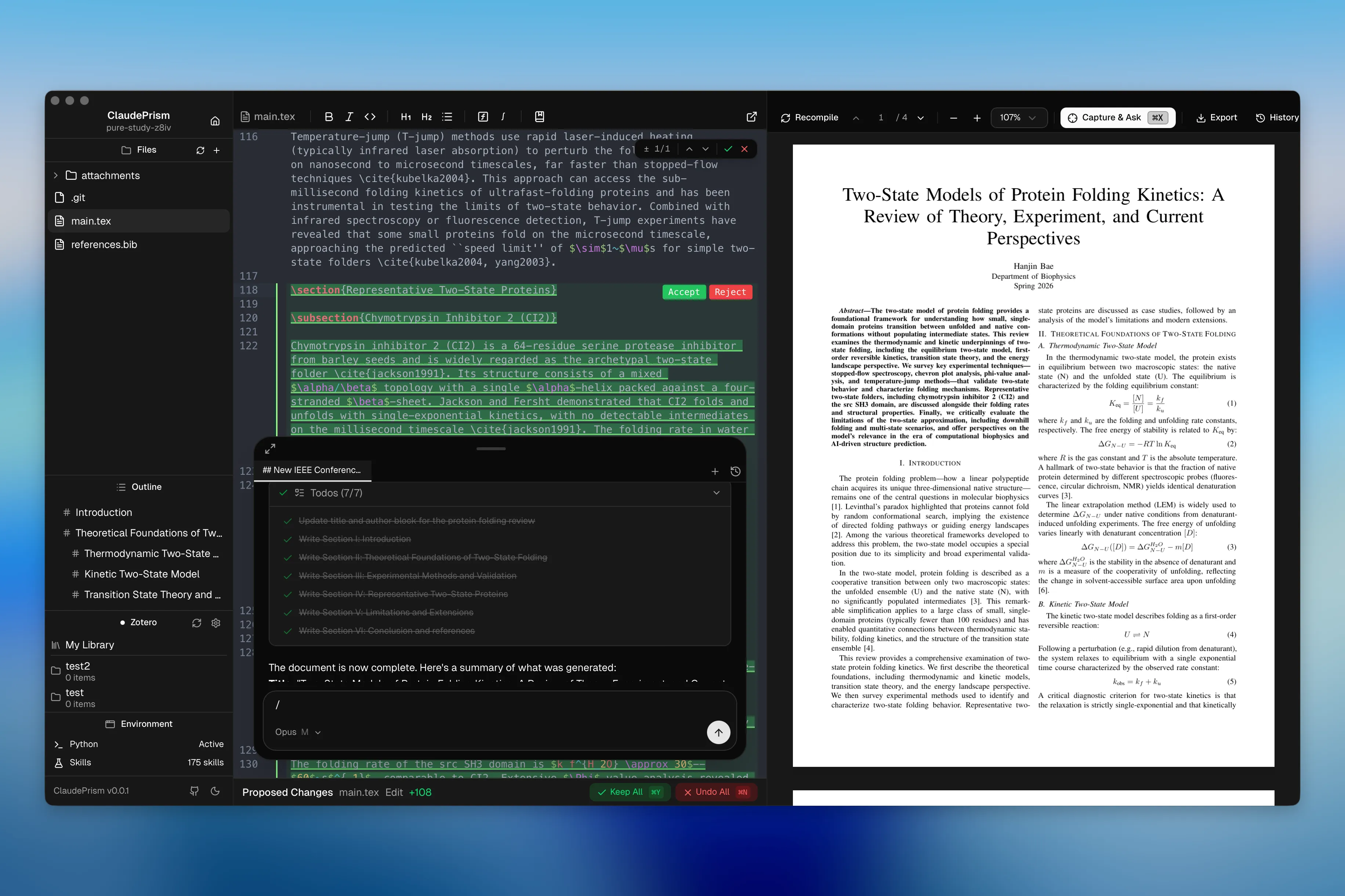
Claude Prism is a native desktop application — built with Tauri 2 and Rust — that packages a LaTeX editor, a Python environment, an embedded PDF viewer, and a Claude-powered chat assistant into one offline-first scientific writing workspace. The project positions itself as a local alternative to OpenAI Prism, a cloud-based LaTeX workspace where files and data must be uploaded to OpenAI servers to use AI features. Claude Prism instead stores and compiles documents on disk: nothing is uploaded to a remote server for storage, though prompts and file contents that Claude reads are still sent to Anthropic's API for inference when you actively use the AI chat.
The editor itself is CodeMirror 6 with LaTeX/BibTeX syntax highlighting, real-time error linting, regex find & replace, and multi-file project support with auto-save, paired with a native MuPDF-based PDF preview that supports SyncTeX (click a spot in the PDF to jump to the matching source line) and a capture-and-ask mode (⌘X) for pinning a screenshot of an equation, figure, or reviewer comment directly into the chat. LaTeX compiles through an embedded Tectonic engine, so after packages are cached on first use, compilation works fully offline with no separate TeX Live install.
What differentiates Claude Prism from a plain text editor is its integration with the Claude Code ecosystem: a built-in Python environment via uv for running analysis scripts and generating plots without leaving the app, a template gallery and project wizard for papers/theses/presentations/posters/letters, Git-backed local history with labeled snapshots and diff review of AI-proposed edits, Zotero OAuth integration for citation insertion, and a marketplace of 100+ domain-specific scientific skills (bioinformatics, cheminformatics, clinical research, and more) sourced from the K-Dense Scientific Skills project.
Core capabilities
Offline LaTeX compilation via Tectonic
Tectonic is embedded in the app; LaTeX packages download once on first use and are cached locally, after which compilation works fully offline with no separate TeX Live installation required.
Built-in Python environment (uv)
One click installs uv and creates a project-level virtual environment; Claude Code automatically uses the .venv when running Python, so you can generate plots and process data inline.
100+ installable scientific skills
Browse and install domain skills curated from K-Dense Scientific Skills — bioinformatics, cheminformatics, ML, clinical research, multi-omics, and scientific communication — installed globally or per project.
Live PDF preview with SyncTeX
Native MuPDF rendering supports zoom, text selection, and clicking a PDF position to jump to the corresponding source line; a Capture & Ask mode (⌘X) pins a selected PDF region to the chat.
History and proposed-change review
Every save snapshots to a local Git repository (.claudeprism/history.git/); checkpoints can be labeled, diffed, and restored. Claude's suggested edits appear in a diff panel to accept/reject per chunk or apply/undo all.
Template gallery and project wizard
Pick a template — paper, thesis, presentation, poster, letter — name it, optionally describe the content, and the wizard scaffolds the project and generates initial content with AI.
What you can use it for
Drafting a thesis or paper fully offline
Start from the template gallery, write in the CodeMirror LaTeX editor, and compile with the embedded Tectonic engine without an internet connection once packages are cached.
Running analysis alongside the manuscript
Use the built-in uv-managed Python environment to run scripts and generate plots, then reference the output figures directly in the same project without switching tools.
Reviewing AI-suggested edits before accepting them
Ask Claude to revise a section; inspect the visual diff in the Proposed Changes panel and accept or reject each chunk individually, or apply/undo everything with ⌘Y / ⌘N.
Asking about a captured figure or equation
Press ⌘X to select a region of the rendered PDF — a chart, a proof, a reviewer comment — and it is pinned to the chat composer so you can ask Claude about it directly.
Installing a domain skill for a specific analysis
Browse the 100+ K-Dense scientific skills catalog and install, say, an RDKit or Scanpy skill so Claude has deep, tool-specific knowledge for that part of the project.
How to get started
- 1
Download the app
Grab the latest build for macOS (Apple Silicon or Intel), Windows, or Linux (AppImage) from the GitHub Releases page and install it like any desktop application.
- 2
Create or import a project
Use the template gallery and project wizard to start a paper, thesis, presentation, poster, or letter, or drag in existing reference files (PDF, BIB, images).
- 3
Set up Python and skills (optional)
Click to install uv and create a project virtual environment if you need to run analysis scripts; browse and install relevant scientific skills from the built-in marketplace.
- 4
Write, compile, and chat with Claude
Edit in CodeMirror, compile offline via the embedded Tectonic engine, preview with SyncTeX-linked PDF rendering, and use the chat panel (Sonnet/Opus/Haiku selectable) for edits, review, and Q&A.
How it compares to similar skills
Claude Prism is a full desktop application rather than a Claude Code skill you drop into a project — pick it if you want a self-contained local writing environment. For skill-based workflows that live inside an existing Claude Code project, the alternatives below are lighter-weight.
LaTeX Document Skill
Pick LaTeX Document Skill if you just need a Claude Code skill for generating and compiling LaTeX documents (resumes, theses, posters) inside your existing terminal workflow, without a separate desktop app.
Claude Code My Workflow
Pick Claude Code My Workflow if you want a forkable multi-agent research-program template (papers, slides, replication) rather than an editor application.
Academic PPTX Skill
Pick Academic PPTX Skill if your immediate need is specifically presentation slides rather than a full LaTeX writing workspace.